

Product Overview
Brand: ARCSTILL
Color: Black
Features:
- 【V5 Pro Backlit Voice Remote for Model Numbers】 Compatible with vSeeBox models including V6 Plus/Max, V6 Pro, V5 Pro, V3 Pro, V3 Plus, V1, V1 Pro, V2, V2 Pro, V1 Max, Elite, Max
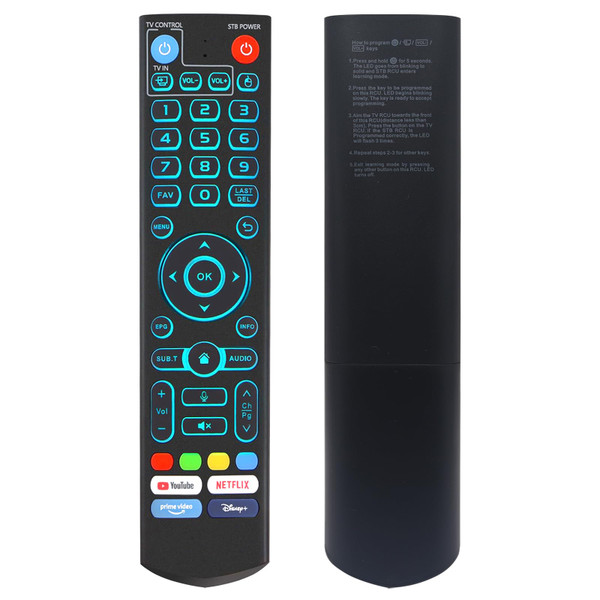
- 【With backlight】 Backlit buttons illuminate softly for effortless navigation in low-light conditions. Whether you're watching movies at night or enjoying a darkened home theater, find the right button instantly—no need to turn on the lights
- 【Smart Voice Search】 The V5 Pro voice remote control features a microphone button, enabling voice search for content, volume adjustment/input source switching, and music playback. Simply speak your commands to effortlessly control your TV, adjust the volume, or play your favorite music; Please note: V1 Max, V1 Pro, and V2 Pro do not feature voice command capability
- 【Programming Instructions】 Simply press and hold the Power button for 5 seconds until the LED stays lit, then press the button you wish to program on the V5 remote, point it face-to-face with your original remote and press the corresponding button—a successful program will cause the LED to flash 3 times—then repeat for other buttons, and press any button to exit learning mode, turning off the LED.
- 【How to Pair】 Press and hold the "OK" and "Vol-" buttons simultaneously for about five seconds—the remote's indicator light will flash continuously to confirm Bluetooth is enabled. Then head to System Settings > Bluetooth > Pair New Device, select the remote, and connect.The V5 Pro remote features dual operating modes: V3 (default) and V2. To switch between modes, press and hold the number 5 button for more than ten seconds.
- 【One-Touch Streaming Access】 With dedicated shortcut buttons for YouTube, Netflix, Prime Video, and Disney+, you can instantly access your favorite streaming services with just one press. No need to navigate through menus—enjoy seamless entertainment at your fingertips