

Product Overview
Brand: YAODEMA
Color: black
Features:
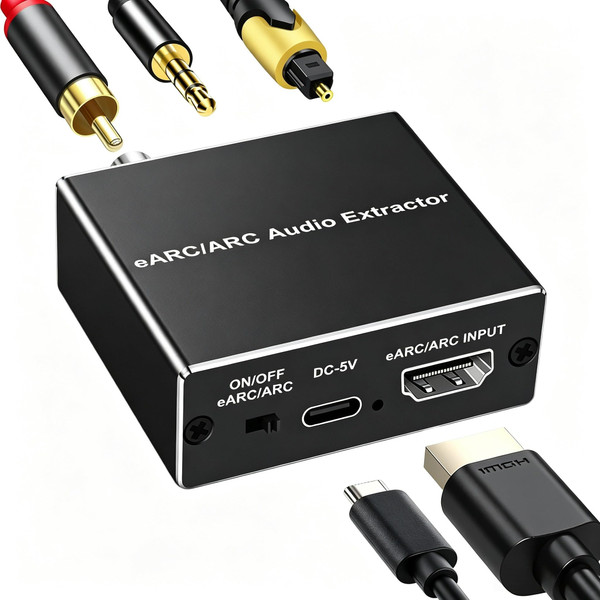
- 【eARC/ARC Function - Check Your TV First】: This hdmi audio extractor lets your TV send audio Extractor the Audio from TV to Soundbar or Amplifier, allowing you to enjoy an immersive home theater experience instead of the poor sound of TV.(Note:Your TV must have an HDMI port labeled "ARC" or "eARC" – otherwise it won't work. Please check your TV's HDMI ports before purchasing.)
- 【Multiple Audio Output Options】This HDMI to optical audio adapter extracts high-quality digital audio from your TV's HDMI ARC/eARC port and converts it to optical (Toslink/SPDIF) /Coaxial/ 3.5mm outputs, enabling seamless connections to soundbars, home theater systems, and amplifiers. (NOTE: Please Set the Audio Output to PCM or LPCM before Using)
- 【192KHz Lossless Audio Sampling Rate】: This HDMI ARC/eARC Audio Extractor supports sampling rate at 32, 44.1, 48, 96 and 192 KHz. Supports 5.1 channel surround sound, including PCM 2.0, Dolby 5.1 and DTS 5.1 Audio Formats to Provide You with High Quality Audio for an Immersive Entertainment Experience. This HDMI to optical converter delivers theater-quality audio to your sound system, ensuring every movie, game, or show sounds crisp and dynamic.
- 【Wide Compatibility】 This sleek HDMI eARC/ARC to Optical Converter has a Wide Range of Compatibility, and can be Used with HDTVS to Soundbars, Wireless TV Headphones, and Home Theater. (Please note: This product does not support CEC remote volume control.)
- 【Plug and Play】This HDMI eARC audio extractor is no software or drivers needed, simply connect to the HDMI eARC/ARC port and enjoy instant high-quality audio without delay or distortion. this hdmi arc adapter is providing immersive surround sound for your home entertainment system.
- 【eARC/ARC Troubleshooting】:①Use the TV’s HDMI port labeled “eARC/ARC” ②Unplug and reconnect the HDMI cable after a few minutes.③Plug the adapter into a power source. ④Try a different HDMI cable. ⑤ Make sure the HDMI cable supports ARC. ⑥Set the adapter switch to “ON”. ⑦Check if the power light is on.